> For the complete documentation index, see [llms.txt](https://touchance-1.gitbook.io/touchance/llms.txt). Markdown versions of documentation pages are available by appending `.md` to page URLs; this page is available as [Markdown](https://touchance-1.gitbook.io/touchance/multicharts/jiao-yi-chuan-jie/xia-chan-ji-she-ding/zhui-jia-she-ding.md).
# 追價設定
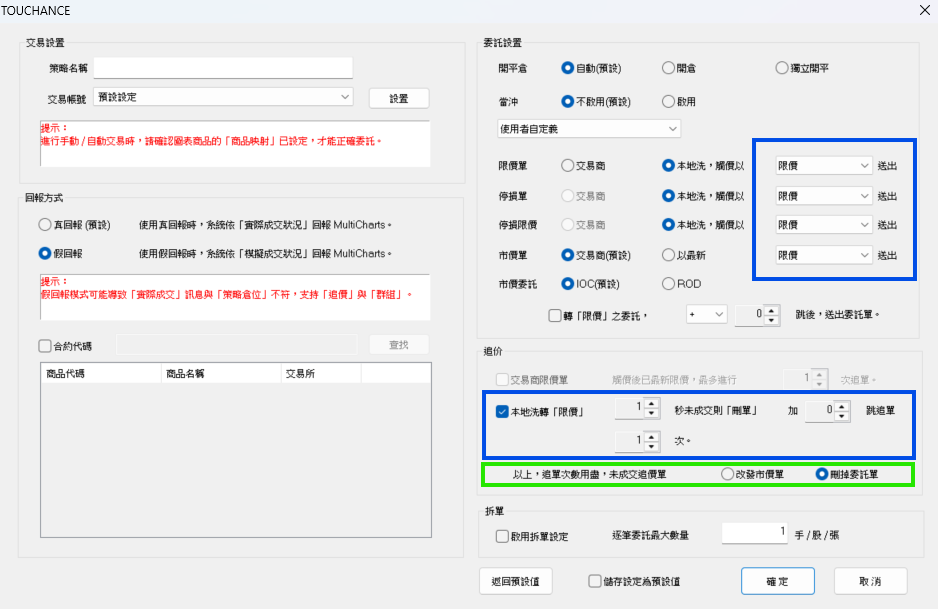
追價用在【限價】委託不成交時,透過追價的方式繼續嘗試送出委託。
一般來説我們建議自動交易使用【市價】來進行交易,這樣可以讓實際的部位與策略相符,盡量減少用【限價】委託可能造成不成交需要【手動補單】或是【調整策略】開關的狀況。
不過,仍然有用戶會希望用【限價】委託來進行,期望可以減少【滑價】或是成交在離譜的價格。
{% hint style="danger" %}
達錢提供【追價】的功能,就是希望可以幫助使用【限價】委託的用戶,可以在自己預期的價格範圍内盡量成交,但不保證一定會幫你追到價格或是成交的價格符合你的期待。
{% endhint %}
### 必須使用【假回報】
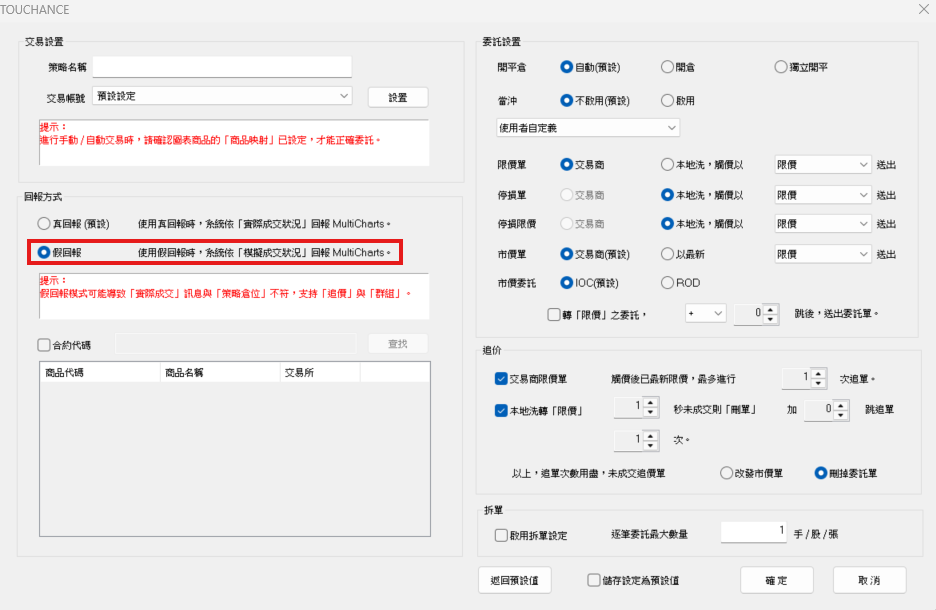
使用追價時,請務必設定使用【假回報】的模式,這樣才能啓用【追價】的功能。
 ### 設定規則説明
追價設定主要分成 2 種
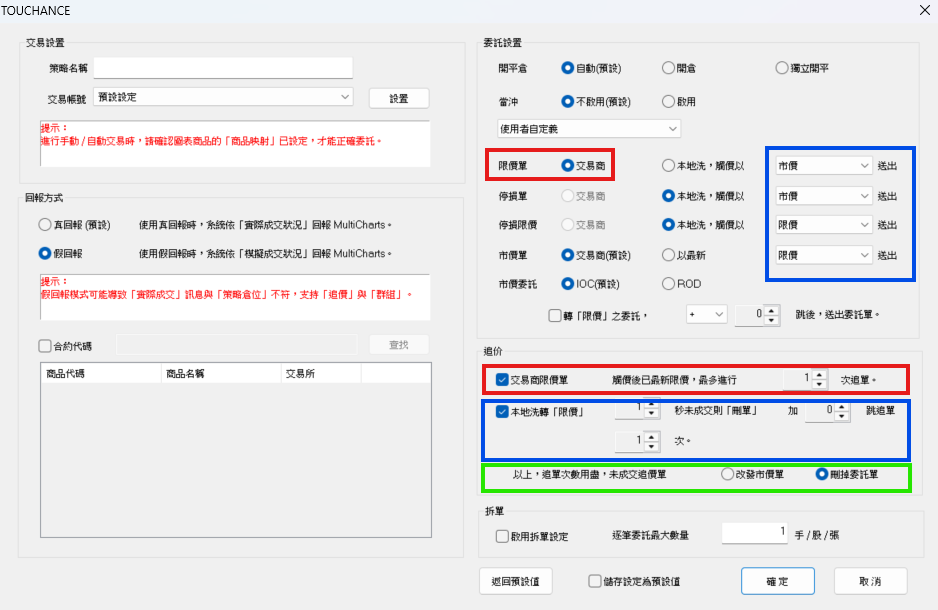
* 【交易商】的限價單(紅框)
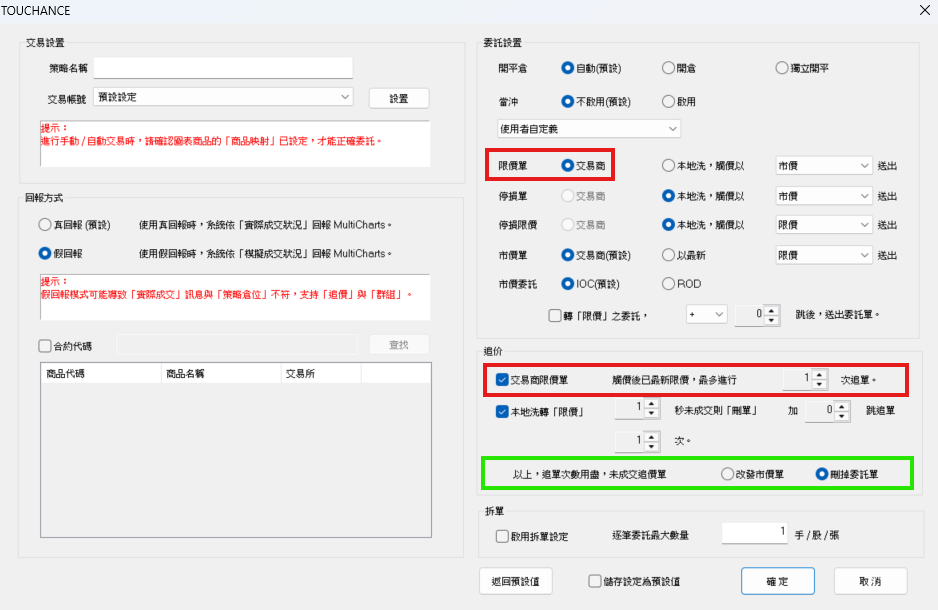
* 本地洗價後,轉成【限價】委託的委託單(藍框)
* 不論是(紅框)還是(藍框)的流程,最後都會走到(綠框)結束整個追價的流程
### 設定規則説明
追價設定主要分成 2 種
* 【交易商】的限價單(紅框)
* 本地洗價後,轉成【限價】委託的委託單(藍框)
* 不論是(紅框)還是(藍框)的流程,最後都會走到(綠框)結束整個追價的流程
 #### 【交易商】的限價單
* 限價單指定送到【交易商】時,可以選用【交易商限價單】功能
* 啓用後,MultiCharts 下限價單後會下到交易商,若沒成交會等著,當市場價格【碰到】委託價格,但是【沒有成交】就又遠離了,會刪單並追價 N 次。
* 當【追價次數】用盡,未成交的委託依據用戶設定,可選擇
* 改發市價單
* 刪除委托單
{% hint style="info" %}
最新限價:當時市場上的最新成交價格,作爲限價委託的價格
{% endhint %}
#### 【交易商】的限價單
* 限價單指定送到【交易商】時,可以選用【交易商限價單】功能
* 啓用後,MultiCharts 下限價單後會下到交易商,若沒成交會等著,當市場價格【碰到】委託價格,但是【沒有成交】就又遠離了,會刪單並追價 N 次。
* 當【追價次數】用盡,未成交的委託依據用戶設定,可選擇
* 改發市價單
* 刪除委托單
{% hint style="info" %}
最新限價:當時市場上的最新成交價格,作爲限價委託的價格
{% endhint %}
 #### 【本地洗】的限價單
* (藍框) 的部分,指定轉為【限價單】時,可以選用【本地洗轉⌈限價⌋】功能
* 啓用後,當有下出本地洗且是限價的單子,當價格觸價後會送到交易商,S 秒後會追價,會用加上 T 個 Tick Size 去追單,追單 N 次。
* 當【追價次數】用盡,未成交的委託依據用戶設定,可選擇
* 改發市價單
* 刪除委托單
#### 【本地洗】的限價單
* (藍框) 的部分,指定轉為【限價單】時,可以選用【本地洗轉⌈限價⌋】功能
* 啓用後,當有下出本地洗且是限價的單子,當價格觸價後會送到交易商,S 秒後會追價,會用加上 T 個 Tick Size 去追單,追單 N 次。
* 當【追價次數】用盡,未成交的委託依據用戶設定,可選擇
* 改發市價單
* 刪除委托單